Video Camera Camcorder
Digital Camera Recorder Full Hd 1080p 15fps 24mp 3.0 Inch
USD $114.95
Condition : New
Free Shipping

Notify me when the price drops
We will email you if we find a lower price on this product!
- 【Video Camera as Webcam】: The video camera is useful to take the beautiful photos and share it in your Youtube. It can be used as webcam when the camera connect the computer. Please operate the camera button to choose the “PC CAM” mode.When the “AMCAP ” window is opened,from which shooting object through the camera will be showed on this window. You can have a video call with your families or friends. Please download the software “AMCAP ” before use the webcam function.
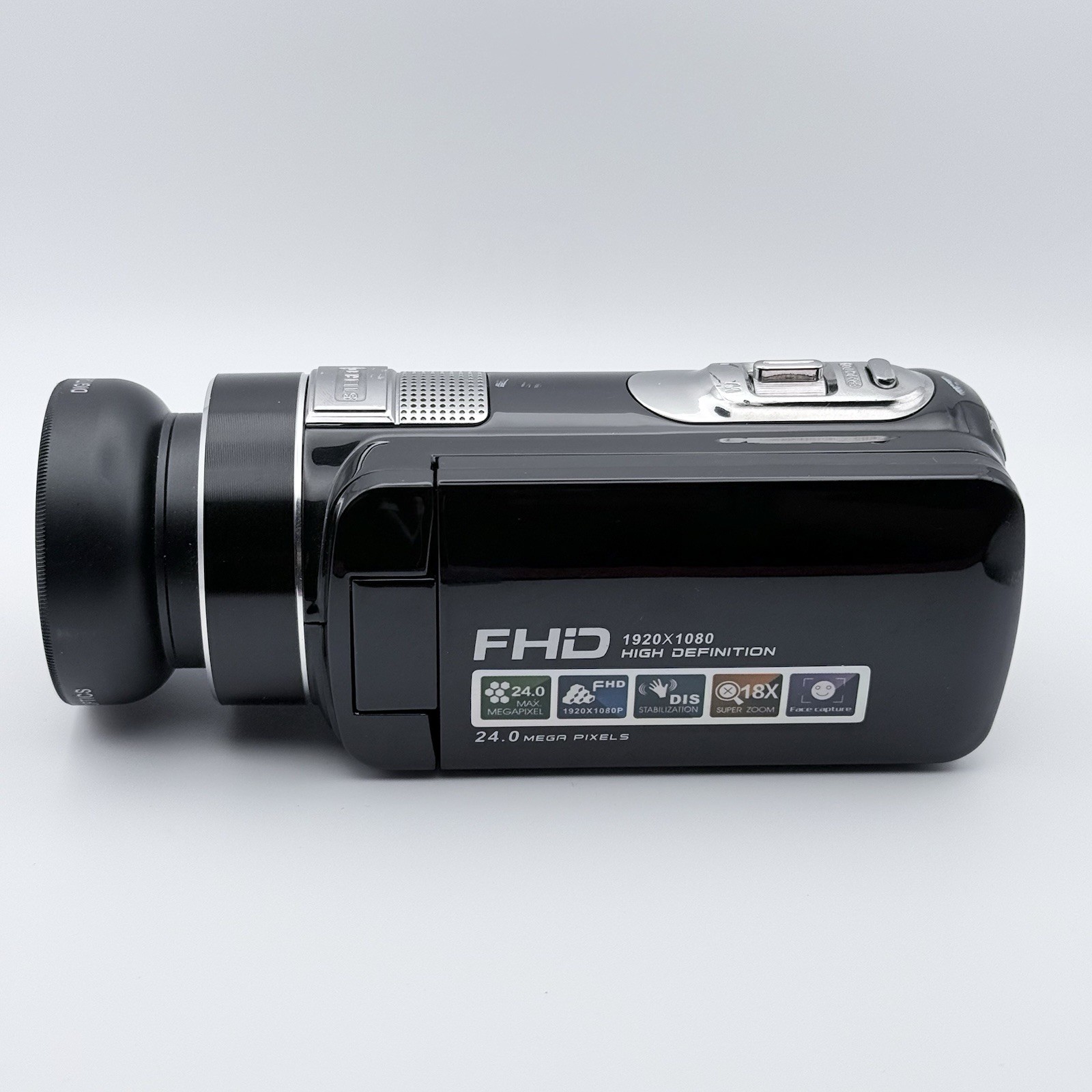
- 【Multifunction Camcorder】: 1080P(15fps) Video Resolution, 24M(6000x4500) Image Resolution, image format (JPEG), video format(AVI), 16X digital zoom, camcorder with fill light, 3.0 inch LCD and supports 270°rotation, Anti-shake, Face Capture, Beauty Function, Self-timer and Webcam function, Pause function, USB 2.0, TV Output, Setting Date and Time.
- 【Pause Function】: This video camera supports Pause function,so you can pause the recording when you need,then continue recording again without starting a new one, which makes it easier for you to edit and upload the videos. This video camera included a USB cable,you can connect it directly to the computer to upload videos. This video camera included a AV cable,you can connect it directly to the TV to playback the videos.
- 【Recording While Charging】: The camcorder come with two NP-FV5 batteries. It allows you to keep recording around 60 to 90 minutes when it's fully charged. For the first time use need to charge more than 8 hours. The camcorder support the recording while charging,good to record long videos anytime.
- 【Small and Compact Camcorder】: The camcorder supports SD/SDHC card up to 128GB (not included), just remember to format the SD card before use the camcorder first time. The camcorder support the tripod(not included) connection and the hole is standard size.
Product description
Specification: AntiShake: On/Off. Smile capture: On/Off. Video Sound: Support. TV Output: NTSC/PAL.
Pause function:Support. Built-in microphone:Support. USB port: USB 2.0(MSDC&PC CAM).
Date stamp: Off/Date/Date&Time Driver mode: Off, Self-timer 2 seconds,Self-timer 10 seconds,Burst.
LED Fill Light: Fill light can't be used under Playback mode. Display Screen:3.0 inch, 270 degree rotation.
File format: image format (JPEG),video format(AVI). Image sensor:CMOS image sensor,max 24.0 mega pixels.
Digital zoom:16X(Not support the auto focus, optical zoom). Effect: Normal/B&W/Sepia/Red/Green/Blue.
Format:Yes/No(format the SD card first). Image Resolution:24M(6000x4500),20M(5120x3840),16M(4608x3472),12M(4000x3000).
Operating system requirements:Windows 7/8/10/2002/XP/Vista/macOS. White balance: Auto/Daylight/Cloudy/Fluorescent/Tungsten.
Focusing Range: Normal 1.2m to infinity; Micro 15cm to 25cm. Modes:Take Photos/Record Videos/Record Audio/Playback Modes.
Memory Card:Support SD memory card and MMC card,4GB up to 128GB.(the SD card is not included in the package,need to purchase separately).
Camera lens: Fixed lens,Aperture F/3.2,Focal distance f=7.36mm. Video Resolution: FHD 1920x1080(15fps), HD 1280x720(30fps),640x480(30fps).
Package Included:
(1)1XCamcorder (2)1XUser manual (3)1XUSB charger (4)1XAV&USB cable (5)1XReusable camcorder bag (6) 2XRechargeable Lithium batteries
Warm Tips:
(1)The camcorder is design for the amateurs,not for the Professional users. (2)The camcorder only can support LED Video Light, as Light Supplement(Not Include), not support the external microphone. (3)Please format the SD card before use the camcorder(in order to avoid system malfunction),the SD card is not included in the package.
The camera can support TV and Computer outputConnect to the TV:
1. Please connect the camera to your TV with the AV cable.
2. Please set the TV signal source as AV and get into this mode.
3. You will find the camera screen that turning black which is normal, not the camera malfunction. And the content will be displayed on your TV screen. You need to operate the camera to display your photos/videos. (Notice: In this mode, the icons on the screen cannot be removed.)
Connect to the Computer:
1.Please turn on the camera,insert the USB Cable into the camera and computer port separately.
2.The computer will automatic install driver and the computer screen will display the driver installation is complete.
3.Please press the camera "MODE" button to choose the camera “MSDC ”mode,then open the U disk,the camera files can be seen.
Please format the sd cardThe camcorder can support SD/MMC Memory Card. (4GB to 128GB, Memory Card needs to buy separately).
Warm Tips:
1. Memory card needs to be formatted for first-time use or if the card was used by other camcorder.)
2. If the camera crashes or shows a blurred screen, please format the SD card within the camera or on the computer before using it.
3. If the SD card can't be locked in the slot, which means it has not reached the correct position and you need to press deeper to make sure it is locked.
If you want to use the camera as a webcam to have video calls or Live stream:
1. Please connect the camera to your PC.
2. You will see 2 choices on the screen: "MSDC" & "PC camera", choose the "PC camera" and press OK". If it has been confirmed, there would be a camera icon on the screen.
3. Open the software you want to use (We recommended to use "AMCAP", it is easy to download and use).
The camera can support record while charging, you can connect the camera to the power source and don't need to worry the batteries run out.
The camera can support the Pause function, you can pause and continue the recording at your wish without starting a new file.
The camera use of detailed instructions:
1. Insert the fully charged battery and memory card into the camera, then press the" POWER" button to turn on the camera.
2. How to format the memory card: Please press the "Mode" button to get into the "Setup" page. Choose the "Format" option and press "OK" to confirm.
3. How to switch modes: Press the "Mode" button to switch modes between "Photo/Video/Setup".
4. How to take photos: Press the "Mode" button to change to the "Photo" mode. Press the "Photo" button to take a photo.
5. How to record videos: Press the "Mode" button to change to the "Video" mode. Press the "START/STOP" button to start the recording. You can press the "Photo" button to pause the recording. And press the "START/STOP" button to finish the recording.
6. How to playback photos/videos: Press the "Playback" button(Beside the Menu button), and then press the "Left/Right" button to browse. Press the "START/STOP" to playback video and press the "Photo" button to pause.
7. How to delete photos/videos: Press the "Playback" button(Beside the Menu button), and then choose the one you want to delete, press the "Menu" button then choose "Delete" and confirm to delete.
8. How to adjust the volume: The volume can be only adjusted while playback. Use the zoom toggle to adjust the volume.
9. How to turn on the fill light: Press the "OK" button to turn on the light and press it again to turn off.
ABOUT USWelcome to our Ebay store! FAST FREE SHIPPING ON ALL PRODUCTS! Please look through our selected quality items to see if you can find what you are looking for or to discover new and exciting things. Our main goal is to bring you the best services which includes quality products at the best prices, fast free shipping and great customer support !
SHIPPING- We ship to the Lower 48 States only (Does NOT include Hawaii or Alaska)
- We cannot ship to PO Boxes/APO's
- We cannot combine shipping.
- No Local Pickup.
- NOTE: we ship from multiple locations
We have a NO returns policy on this product, but we will make sure you receive it in perfect condition( in case of damage on arrival let us know within 2 days for a solution/replacement).
PAYMENTWe accept PayPal.
CONTACT USThis page content is yet to come
Please ad us to your favorite seller and visit again later
Thank You
If you have a question about a product not otherwise answered in the item description, please contact us via eBay messages first and allow us the opportunity to help you. Your satisfaction is our #1 priority ! In any situation before opening a case please do contact us for a resolution!!







 .
.
